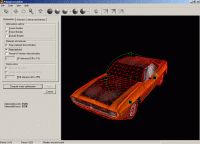
Polygon Cruncher reduces the number of polygons of your 3D objects without changing their appearance. You keep all details even at high optimization ratio. You also keep texture information, vertex colors. It includes batch optimization processing.
Polygon Cruncher is a software and a plugin for LightWave Modeler V6.x to V10.x (x32 and x64) / Inspire 3D and 3DS Max V5.x to 2012 (x32 and x64) / 3DS VIZ / Autodesk VIZ.
Polygon Cruncher reduces the number of polygons of your objects without changing their appearance. You keep all details even at high optimization ratio. You also keep texture information, vertex colors. You can also optimized taking care of the symmetry of your objects.
Polygon Cruncher has an OpenGL view which allows controlling optimization results whenever you want.
Moreover, Polygon Cruncher features batch processing : select the optimization levels you wish and let's go!
Polygon Cruncher uses an exceptional algorithm, which gives incomparable results, really better than what you can get with optimizer provided with 3DS Max or Lightwave.
Polygon Cruncher is really simple to use. It has been chosen by major 3D companies.
Polygon Cruncher list of features :
- An intelligent reduction of the number of faces : useful faces are removed at last. So you can reduce your model up to 75 % without removing details.
- Optimization is pre-calculated, which allows to optimize the scene in real time.
- You control accurately the number of faces or points you want.
- Polygon Cruncher keeps all UV textures channels information and vertex colors channels information.
- You can apply Polygon Cruncher on one or more objects at the same time, on one materials or several materials. You can work on a faces selection or on an invert faces selection.
- Respect of symmetry for objects that are symmetrical
- You can protect the border of the objects. Polygon Cruncher allows you to protect or to exclude objects borders. So your objects stays connected after optimization process.
- An OpenGl preview which allows you to control optimization results.
- Batch optimization of a set of files. You define clearly the optimization levels you wish for each files.
- Polygon Cruncher is very fast. Whats new in version 11.02: 3DS Max 2010 x32/x64 bits support, improved optimization particularly on x64 bits system, normal optimization support Requirements: Lighwave (5.x to 9.x (x32/x64)) or 3DS Max (5.x to 2010 (x32/x64)) needed Operating system: Windows Vista / Vista 64 bit / 7 / 7 64 bit / 8 / 8 64 bit / 10 Release notes: Major Update
MagicBD is a graphic software which can be used to draw many kinds of iconographies, illustrations and sketch maps.It can also be used to edit images to process them or get some special effects.
Price: $28, Rating: 10, Downloads: 234 Download
Pos Free Photo Editor is a free photo editor from the authors of the best free professional photo editor - Photo Pos Pro free photo editor. The software is simple and very user friendly photo editor, that lets you easily view, and enhance your photos
Price: $0.00, Rating: 10, Downloads: 190 Download
Design over 10 photos by few mouse clicks. Easily create photo book, collage, calendar, greeting cards, wedding photos and more artworks.
Price: $39.95, Rating: 0, Downloads: 171 Download
Image Frame is a Photoshop-compatible plug-in for easy creation naturally-look 3D frame. Add frame and text to your photos. You can apply rectangular and elliptical frame, change frame profile, material, and lightening.
Price: $14.95, Rating: 10, Downloads: 160 Download
User Rating
Rating:2.2 out of
5 Based on13 ratings.
13 user reviews.

 Polygon Cruncher 11.02 details